VITAL: Explore AI Workflows. Inspect the Evidence. Keep Humans Accountable.
A visual blueprint of VITAL — the healthcare AI sandbox where clinicians build synthetic cases, explore workflows, change scenarios, verify AI outputs against source records, and document findings before any system touches a live patient. The infographic maps the six-step process from case assembly to pilot planning.
Most healthcare AI infographics show a model architecture. This one shows the decision architecture — the six-step process a clinician follows to evaluate whether an AI workflow is safe to deploy.
VITAL is not a model. It is an educational sandbox. The infographic maps how it works: synthetic cases, structured exploration, adversarial scenario testing, source verification, and documented findings that inform real pilot planning.
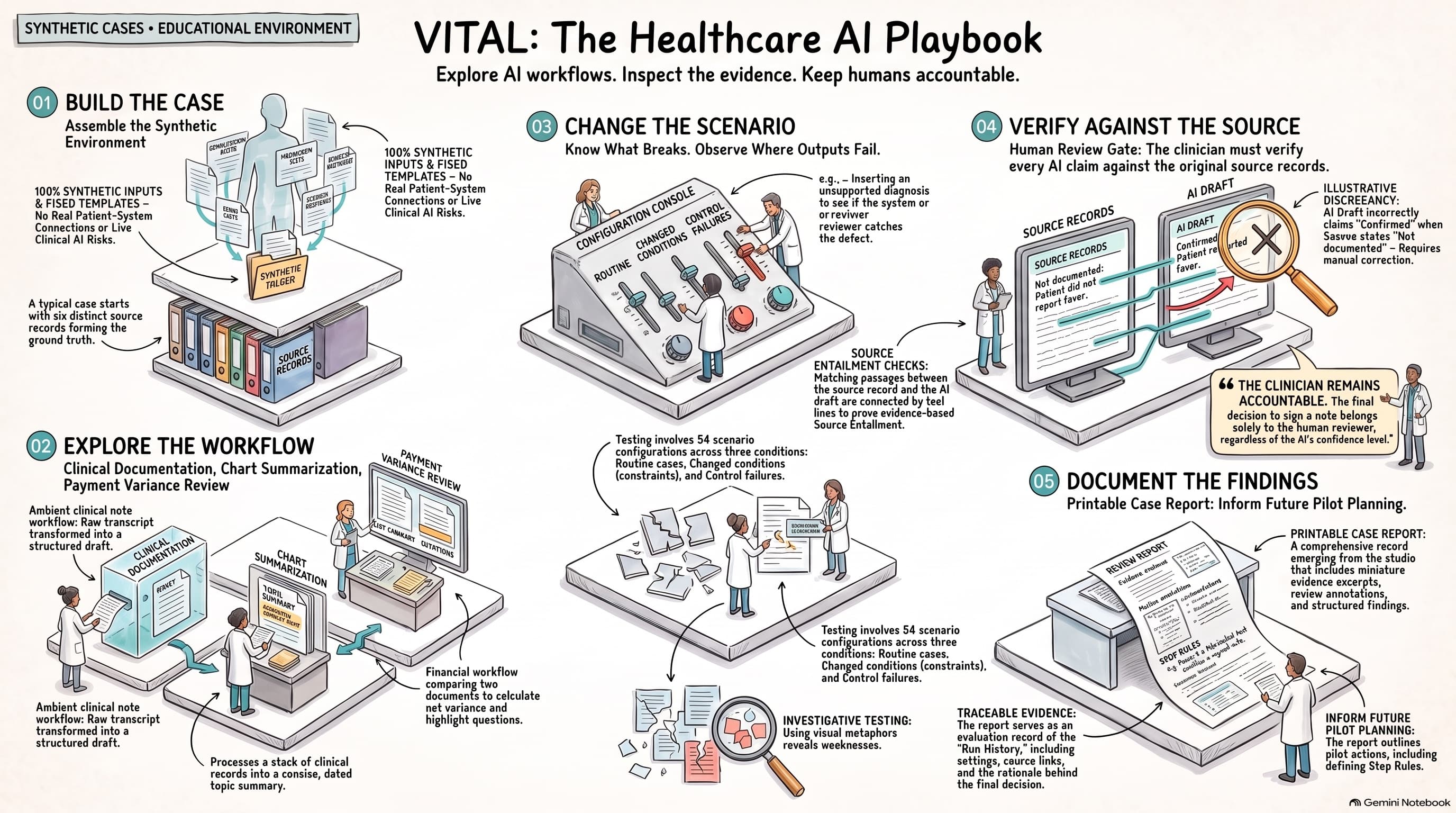
Step 01: Build the Case — Assemble the Synthetic Environment
The infographic begins at the top left. Every VITAL session starts with a synthetic environment assembled from fixed templates. 100% synthetic inputs. Fixed templates. No real patient-system connections. No live clinical AI risk.
A typical case starts with six distinct source records forming the ground truth. These are not anonymized patient records — they are purpose-built synthetic records designed to test specific workflow behaviors. The clinician knows every input before the AI produces any output.
Step 02: Explore the Workflow
The second panel maps three representative workflows: Clinical Documentation, Chart Summarization, and Payment Variance Review.
Ambient clinical note workflow — raw transcript transformed into a structured draft. The clinician sees both the original transcript and the AI-generated note, with every claim in the note traceable to a specific segment of the transcript.
Chart summarization — clinical records processed into a concise, dated topic summary. The sandbox highlights conflicts between records and flags coverage gaps — places where the summary omits information present in the source.
Financial workflow — competing line documents calculated to surface net variance and highlight questions. The payment variance review shows reference rates and calculated variances, forcing the user to trace the math before accepting the output.
Step 03: Change the Scenario — Know What Breaks. Observe Where Outputs Fail.
The centre of the infographic maps the scenario engine. Testing involves 54 scenario configurations across three conditions: routine cases, changed conditions (constraints), and control failures.
This is where VITAL earns its tagline. A workflow that handles a routine case correctly may fail when conditions change — when a patient has comorbidities, when records conflict, when the AI encounters data outside its training distribution. The sandbox forces clinicians to test all three conditions systematically.
Source entailment checks — matching passages between the source record and the AI draft are connected by teal lines to prove evidence-based Source Entailment. Where the AI draft makes a claim that the source record does not support, the sandbox flags it. Where the AI reverses a source statement, the sandbox highlights the reversal.
Step 04: Verify Against the Source — Human Review Gate
The right side of the infographic maps the verification architecture. The clinician must verify every AI claim against the original source records.
The infographic illustrates a specific failure mode: an AI draft incorrectly claims "Confirmed" when the source states "Not documented." This is not a hypothetical — it is the kind of subtle discrepancy that passes unnoticed in production systems without structured source verification. The sandbox makes these discrepancies visible and requires manual correction.
Source records are displayed alongside the AI draft. The clinician confirms, flags, or corrects each claim. The goal is not to test the AI's accuracy — it is to test whether the verification workflow catches the errors the AI will inevitably produce.
Step 05: Document the Findings — Printable Case Report
The fifth panel maps the documentation output. Testing involves 54 scenario configurations across three conditions: routine cases, changed conditions, and control failures.
Traceable evidence — the report serves as an inspectable review record of each "Run History," including settings, source data, and the rationale behind the final decision.
Printable case report — a comprehensive record generated from the studio that includes miniature evidence excerpts, review annotations, and structured findings. This is the artifact the governance committee reviews — not a score, but a documented decision trail.
Step 06: Inform Future Pilot Planning
The final panel closes the loop. The report outlines pilot actions, including defining stop rules. The output of a VITAL session is not a pass/fail — it is a deployment specification: what the workflow needs to prove in a real environment, what instrumentation is required, what the override rate tolerance should be, and what the governance committee should review before clearance.
The governing principle
The infographic's central callout captures the thesis: "The clinician remains accountable. The final decision to sign a note belongs solely to the human reviewer, regardless of the AI's confidence level."
VITAL does not test AI. It tests the human system around the AI. A sandbox that makes the clinician's decision visible, traceable, and documented — before the AI touches a single real patient.
VITAL is live and free to use.
Launch the Healthcare Playbook → — the strategic companion.
Launch MedConsult AI → — the clinical workflow platform.

Richard Leclézio
Enterprise Transformation & AI Delivery Leader